Category Archives: Computing

How to Power Modern Economies: Read Your Meter

Read you meter at home. This fun-filled advice was given by Sir David MacKay in a wonderful TEDx talk about how we heat our homes, get to work, run our computers, and how it all scales across countries and continents. The idea is really about how we run our lives while also trying to pass on a livable planet to our grand-children without the politically correct “greenwash” and self-righteous “claptraps”. Read your meter, do some algebra, and embrace the adventure to explore your home, your life, and the energy it all takes. If you read this far, watch the movie

David MacKay taught physics and information theory at the University of Cambridge in England. I learnt of him via Ruth Mottram in one of her many tweets. Dr. Mottram studies climate impacts of Greenland glaciers and works at the Danish Meteorological Institute. The tweet made me buy the book “Information Theory, Inference, and Learning Algorithm’s” that David MacKay wrote a few years back. It arrived today.

What piqued my interest was the advanced math that goes into designing networks that send and transform information such telephone calls via wireless, computer networks, and how to deal with imperfect channels of communication. My marriage comes to mind, too, because what I say is not always what I mean which is not always what my wife hears and vice versa, but I digress. Imperfect communication channels are one challenge we will face in an experiment to explore acoustic underwater data transmissions that hopefully will take place next year out of Thule Air Force Base, Greenland. Water and ice are imperfect communication channels that we need to use wisely to make our whispers carry far. Try to talk to a person across a busy street in Manhattan with all its hustle and bustle; you need to find something smarter and more effective than just simple shouting.

David MacKay wrote a second book that is close to his TEDx talk and is called “Sustainable Energy without the Hot Air.” Experimenting at home like any good physicist does, he discovers that “… the more often I read my meter, the less gas I use!”

There is so much more to this man, his work, and ideas as a physicist with a keen interest in the big picture without skipping the details. Sadly, he died yesterday of cancer too early only 48 years of age.

Thule, Greenland in Sharp Focus

I want to fly like an eagle
To the sea
Fly like an eagle
Let my spirit carry me

Steve Miller Band, 1976

The eagle “sees” the ground, because the twinkling sensation of light tickles her nerves. Today’s cameras work without the twinkle and tickle. They store numbers (digits) that approximate the amount of light passing through the lens. Satellite sensors work the same way. The data they beam to earth give me the soaring feeling of flying like an eagle, but there is more to the bits and bytes and digits sent home from space to our iPhones, laptops, and the internet.

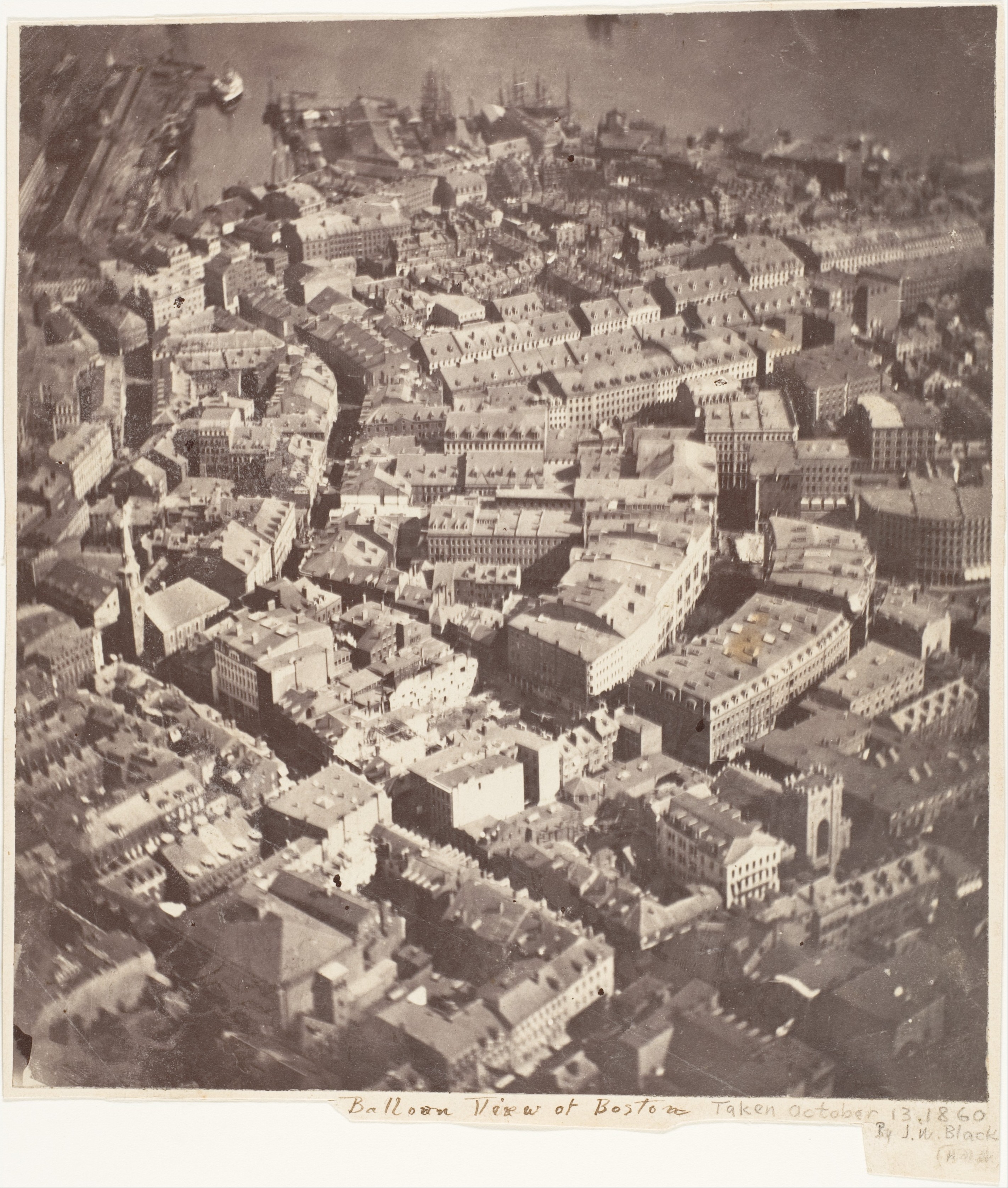
Aerial photo taken Oct.-13, 1860 of Boston, MA by J.W. Black.

Aerial photo taken Oct.-13, 1860 Boston, MA from a balloon by J.W. Black.

The Metropolitan Museum of Art in New York houses the earliest existing aerial photo that was taken from a balloon hovering 600 meters above Boston, Massachusetts. Within a year the American Civil War broke out and this new technology became an experimental tool of war. It advanced rapidly, when air craft replaced the balloon during the First World War. Sharp photos of bombed-out battle and killing fields along the entire Western Front in France were taken by both Allied and German soldiers every day. Placing these photos on a map for efficient analyses of how a land- sea- or ice-scape changes over time, however, was impossible, because photos do not record precise locations.

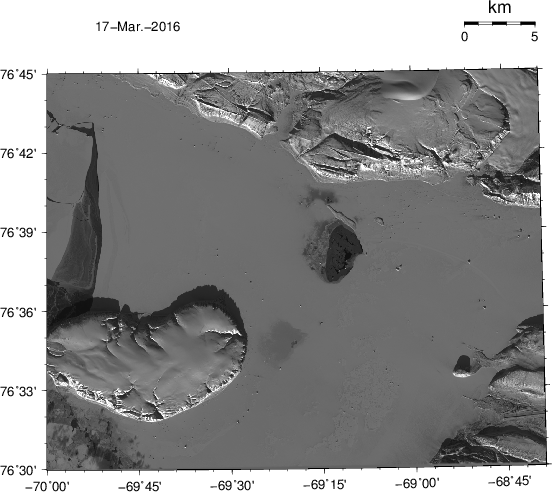
Modern satellite photos are different. We now have fancy radar beams, computers, and several Global Position Systems (GPS) with atomic clocks to instantly calculation satellite tracks every second. This is why we now can both take photos from space AND map every dot or pixel that is sensed by the satellite moving overhead at 17,000 miles an hour snapping pictures from 430 miles above. The camera is so good that it resolves the ground at about 45 feet (15 meters). This is what such a (LandSat) picture looks like

LandSat photo/map of Thule, Greenland Mar.-17, 2016. The airfield of Thule Air Force Base is seen near the bottom on the right. The island in ice-covered Westenholme Fjord is Saunders Island (bottom left) while the glacier top right is Chamberlin Gletscher.

LandSat photo/map of Thule, Greenland Mar.-17, 2016. The airfield of Thule Air Force Base is seen near the bottom on the right. The island in ice-covered Westenholme Fjord is Saunders Island (bottom left) while the glacier top right is Chamberlin Gletscher.

Everyone can download these photos from the United States Geological Survey which maintains a wonderful photo and data collection archive at

http://earthexplorer.usgs.gov

but the tricky part is to turn these images or photos into maps which I have done here. More specifically, I wrote a set of c-shell and nawk scripts along with Fortran programs on my laptop to attach to each number for the light sensed by the satellite (the photo) another two numbers (the map). These are latitude and longitude that uniquely fix a location on the earth’s surface. A “normal” photo today has a few “Mega-Pixels,” that is, a few million dots. Each scene of LandSat, however, has about 324 million dots. This is why you can discern both the runways of Thule Air Force Base at 68 degrees 45′ West longitude and 76 degrees 32′ North latitude. The pier into the ice-covered ocean is just a tad to the south of Dundas Mountain at 68:54′ W and 76:34′ N. A scale of 5 kilometers is shown at the top on the right. For spatial context, here is a photo of the pier with the mountain in the background, that is, the object shown in the photo such as mountain, ship, and Helen serves a rough, but imprecise reference:

Dr. Helen Johnson in August 2009 on the pier of Thule AFB with CCGS Henry Larsen and Dundas Mountain in the background. [Credit: Andreas Muenchow]

Dr. Helen Johnson in August 2009 on the pier of Thule AFB with CCGS Henry Larsen and Dundas Mountain in the background. [Credit: Andreas Muenchow]

This photo shows the airfield and Saunders Island

Thule AFB with its airport, pier, and ice-covered ocean in the summer. The island is Saunders Island. The ship is most likely the CCGS Henry Larsen in 2007. [Credit: Unknown]

Thule AFB with its airport, pier, and ice-covered ocean in the summer. The island is Saunders Island. The ship is most likely the CCGS Henry Larsen in 2007. [Credit: Unknown]

The satellite image of the ice-covered fjord with Thule, Saunders Island, and Chamberlin Gletschers shows a richly texture field of sea ice. The sea ice is stuck to land and not moving except in the west (top left) where it starts to break up as seen by the dark gray piece that shows ‘black’ water peeking from below a very thin layer of new ice. There is also a polynya at 69:15′ W and 76:39′ N just to the south of an island off a cape. A polynya is open water that shows as black of very dark patches. A similar albeit weaker feature also shows to the east of Saunders Island, but it is frozen over, but the ice there is not as thick as it is over the rest of Westenholme Fjord. I suspect that larger tidal currents over shallow water mix ocean heat up to the surface to keep these waters covered by water or dangerously thin ice. There are also many icebergs grounded in the fjord. They cast shadows and from the length of these shadows one could estimate their height. Here is another such photo from 2 days ago:

LandSat photo/map of Thule, Greenland Mar.-21, 2016. The airfield of Thule Air Force Base is seen near the bottom on the right. The island in ice-covered Westenholme Fjord is Saunders Island (bottom left) while the glacier top right is Chamberlin Gletscher.

LandSat photo/map of Thule, Greenland Mar.-21, 2016. The airfield of Thule Air Force Base is seen near the bottom on the right. The island in ice-covered Westenholme Fjord is Saunders Island (bottom left) while the glacier top right is Chamberlin Gletscher.

I am using the satellite data and maps here to plan an experiment on the sea ice of Westenholme Fjord. Next year in March/April I will lead a team of oceanographers, engineers, and acousticians to place and test an underwater network to send data from the bottom of the ocean under the sea ice near Saunders Island to the pier at Thule and from there on to the internet. We plan to whisper from one underwater listening post to another to communicate over long ranges (20-50 kilometers) via a network of relay stations each operating smartly at very low energy levels. We will deploy these stations through holes drilled through the landfast ice 1-2 meters thick. The work is very exploratory and is funded by the National Science Foundation. Wish us luck, as we can and will use it … along with aerial photography that we turn into maps.

Ghosts of Discovery Harbor: Digging for Data

Death by starvation, drowning, and execution was the fate of 19 members of the US Army’s Lady Franklin Bay Expedition that was charged in 1881 to explore the northern reaches of the American continent. Only six members returned alive, however, they carried papers of tidal observations that they had made at Discovery Harbor at almost 82 N latitude, less than 1000 miles from the North Pole. Air temperatures were a constant -40 (Fahrenheit or Celsius) in January and February. While I knew and wrote of this most deadly of all Arctic expeditions, only 2 days ago did I discover a brief 1887 report in Science that a year-long record of hourly tidal observations exist. How to find these long forgotten data?

My first step was to search for the author of the Science paper entitled “Tidal observations of the Greely Expedition.” Mr. Alex S. Christie was the Chief of the Tidal Division of the US Coast and Geodedic Survey. He received a copy of the data from Lt. Greely. His activity report dated June 30, 1887 confirms receipt and processing of the data, but he laments about “deficient computer power” and requests “two computers of standard ability preferable by young men of 16 to 20 years.” Times and language have changed: In 1887 a computers was a man hired to crunch numbers with pen and paper.

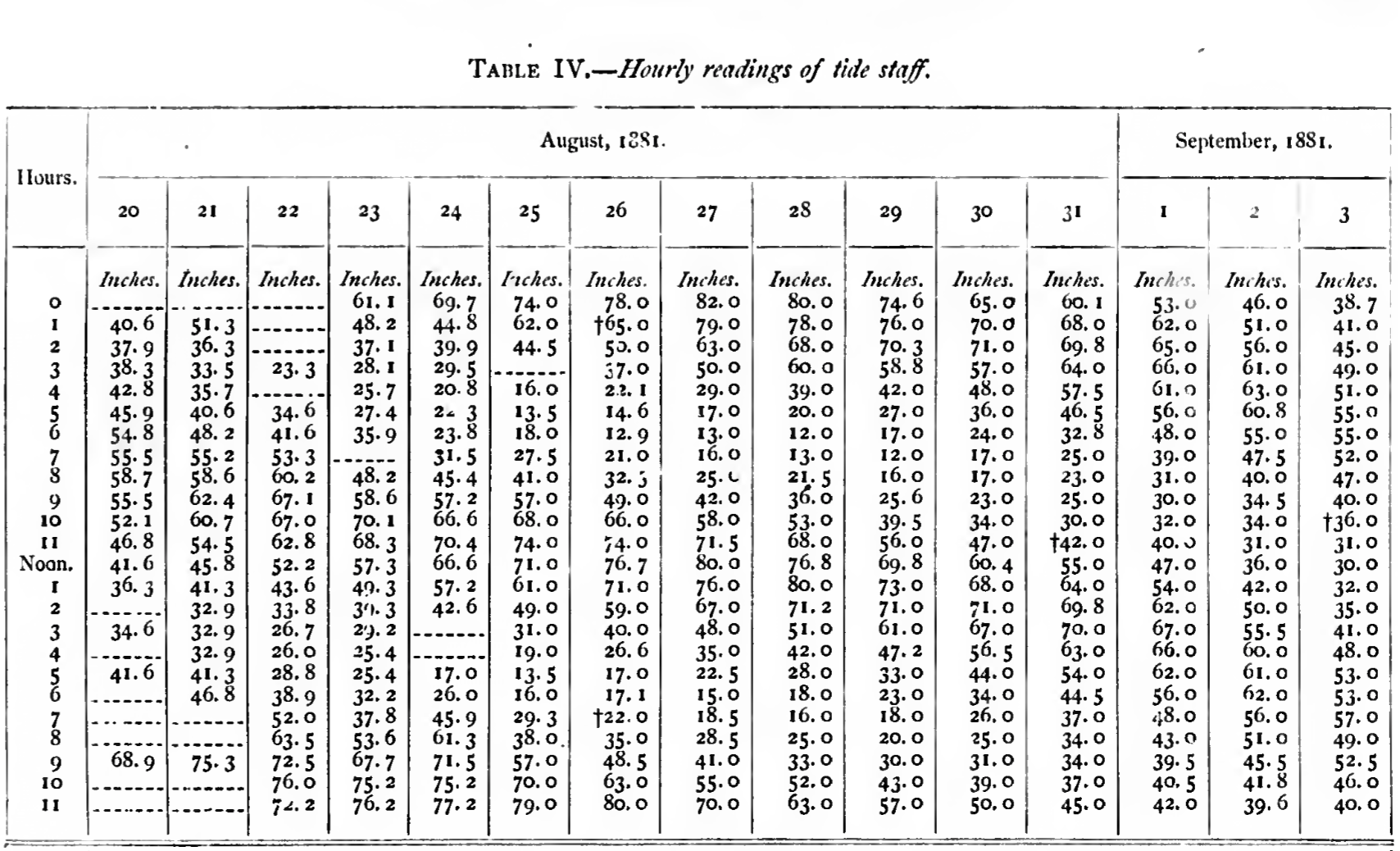
Data table of 15 days of hourly tidal sea level observations extracted from Greely (1888).

Data table of 15 days of hourly tidal sea level observations extracted from Greely (1888).

While somewhat interesting, I still had to find the real data shown above, but further google searches of the original data got me to the Explorer’s Club in New York City where in 2003 a professional archivist, Clare Flemming, arranged and described the “Collection of the Lady Franklin Bay Expedition 1881-1884.” This most instructive 46 page document lists the entire collection of materials including Series III “Official Research” that consists of 69 folders in 4 Boxes. Box-4 File-15 lists “Manuscript spreadsheet on Tides, paginated. Published in Greely (1888), 2:651-662” as well as 3 unpublished files on tides and tide gauges. With this reference, I did find the official 1888 “Report on the United States Expedition to Lady Franklin Bay” of the Government Printing Office as digitized from microfiche as

https://archive.org/details/cihm_29328

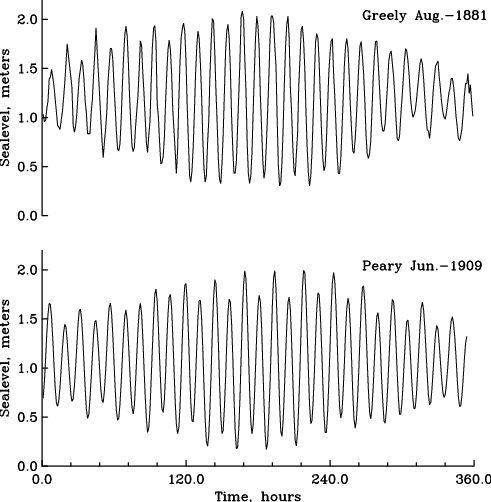
which on page 641 shows the above table. There are 19 more tables like it, but at the moment I have digitized only the first one. Unlike my colleagues at the US Coast and Geodedic Survey in 1887, I do have enough computer power to graph and process these 15 days of data in mere seconds, e.g.,

Hourly tidal observations at Discovery Harbor taken for 15 days by Greely in 1881 and Peary in 1909.

Hourly tidal observations at Discovery Harbor taken for 15 days by Greely in 1881 and Peary in 1909.

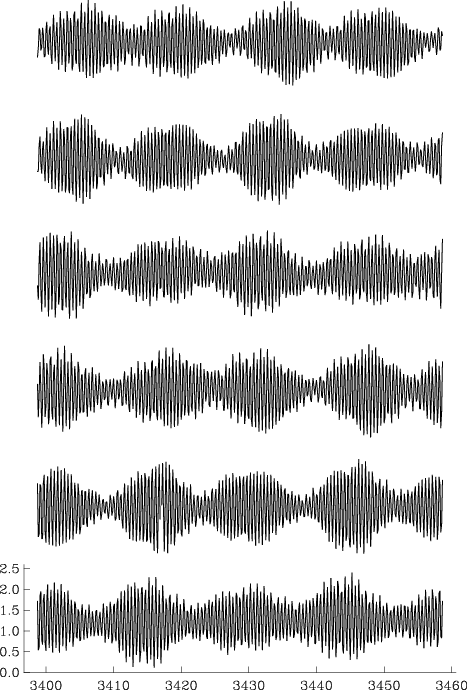
A more technical “harmonic” analyses reveals that Greely’s 1881 (or Peary’s 1909) measured tides at Discovery Harbor have amplitudes of about 0.52 m (0.59) for the dominant semi-diurnal and 0.07 m (0.12) for the dominant diurnal oscillation. My own estimates from a 9 year 2003 to 2012 record gives 0.59 and 0.07 m for semi-diurnal and diurnal components. This gives me confidence, that both the 1881 and 1909 data are good, just have a quick look at 1 of the 9 years of data I collected:

Tidal sea level data from a pressure sensor placed in Discovery Harbor in 2003. Each row is 2 month of data starting at the top (August 2003) and ending at the bottom (July 2004).

Tidal sea level data from a pressure sensor placed in Discovery Harbor in 2003. Each row is 2 month of data starting at the top (August 2003) and ending at the bottom (July 2004).

There is more to this story. For example, what happened to the complete and original data recordings? Recall that Greely left Discovery Harbor late in the fall of 1883 after supply ships failed to reach his northerly location two years in a row. This fateful southward retreat from a well supplied base at Fort Conger and Discovery Harbor killed 19 men. Unlike ghostly Cape Sabine where most of the men perished, Discovery Harbor had both local coal reserves and musk ox in the nearby hills that could have provided heat, energy, and food for many years.

It amazes me, that a 1-year copy of tidal data survived the death march of Greely’s party. It took another 18 years for the complete and original records to be recovered by Robert Peary who handed them to the Peary Arctic Club which in 1905 morphed into Explorer’s Club of New York City. I suspect (but do not know), that these archives contain another 2 years of data that nobody but Edward Israel in 1882/83 and the archivist in 2003 laid eyes on. Sergeant Edward Israel was the astronomer who collected the original tidal data. He perished at Cape Sabine on May 29, 1884, 25 years of age.

Edmund Israel, astronomer of the Lady Franklin Bay Expedition of 1881-1884.

Edmund Israel, astronomer of the Lady Franklin Bay Expedition of 1881-1884.

References:

Christie, A.S., 1887: Tidal Observations of the Greely Expedition, Science, 9 (214), 246-249.

Greely, A.W., 1888: Report on the Proceedings of the United States Expedition to Lady Franklin Bay, Grinnell Land, Government Printing Office, Washington, DC.

Guttridge, L., 2000: The ghosts of Cape Sabine, Penguin-Putnam, New York, NY, 354pp.

Greenland Calling: Iridium Satellite Phone

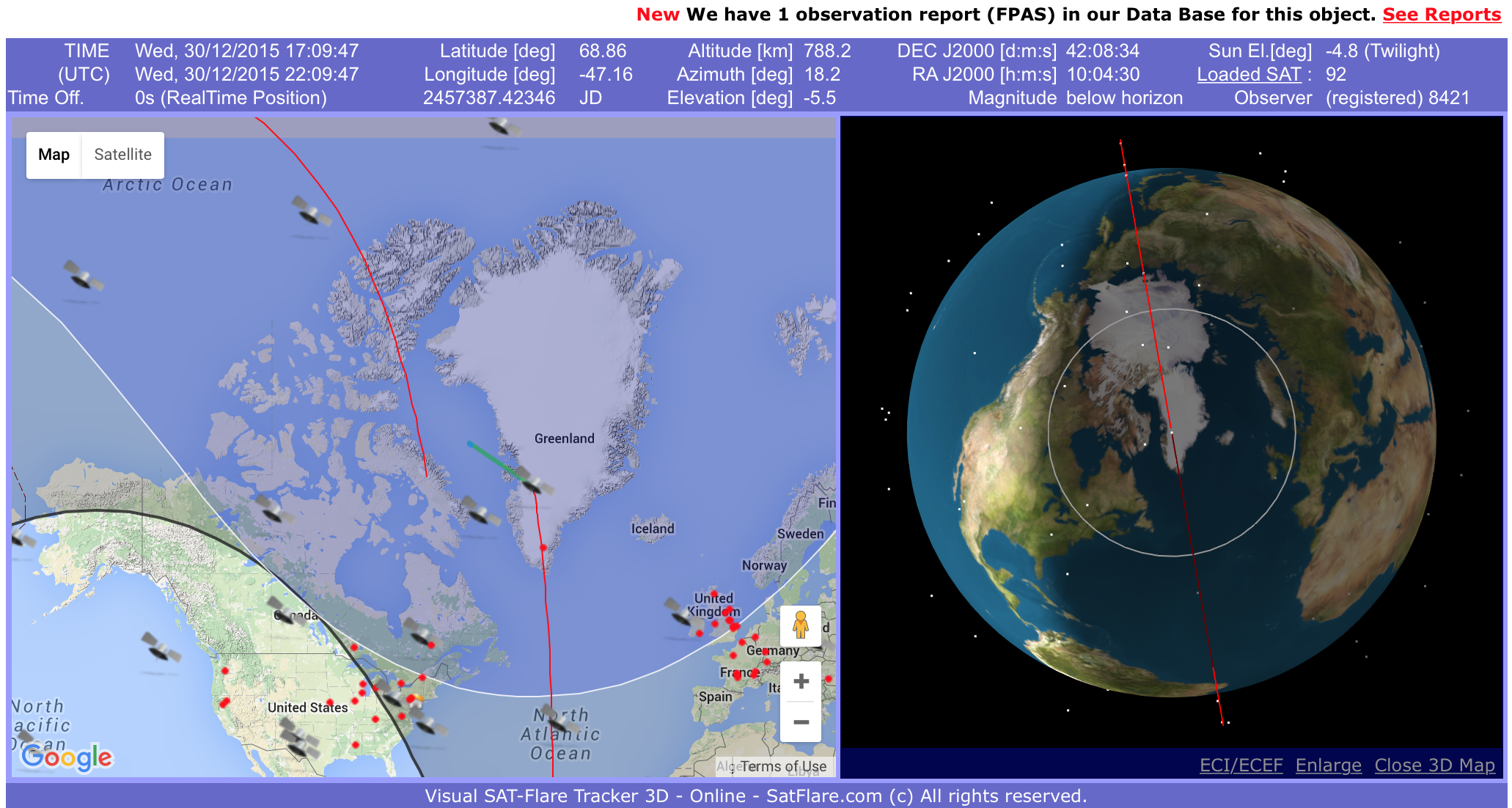
I have trouble calling Petermann Gletscher, Greenland where I am collecting ocean data that feeds into a remote weather station. This station is run on a pair of car batteries, because the solar panels do not work until the sun rises again in two months and the next electrical outlet is about 300 miles away. A computer controls power to sensors and a satellite phone. All calls from and to the station are routed via a commercial satellite phone system that consists of about 66 satellites orbiting our planet. They often appear as shooting stars in the night sky that are called Iridium flares. As beautiful as these orbiting satellites are, they have driven me mad.

Screen shot of Iridium satellite orbits observed in real-time from http://www.satflare.com/track.asp?q=iridium

Screen shot of Iridium satellite orbits observed in real-time from http://www.satflare.com/track.asp?q=iridium

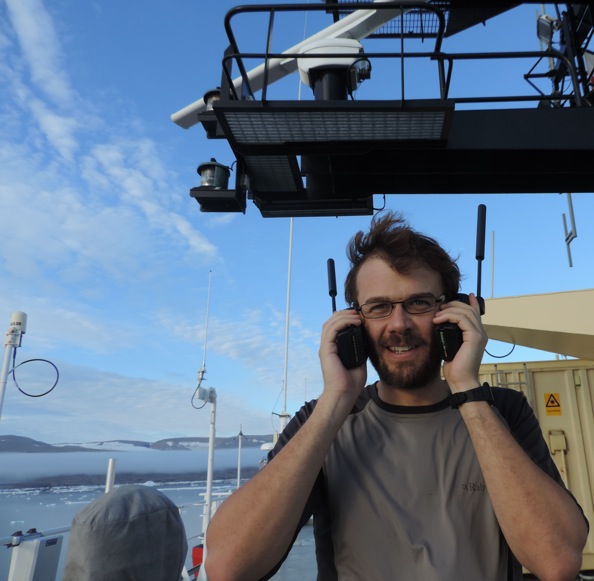
Iridium satellite phones and modems connected to computers are the only way to get data from remote areas of the Arctic and Antarctic. Some modems send small text messages called Short-Burst-Data (SBD) while other modems support a true two-way dial-up connection that includes all the hand-shaking of a telephone call. This computer-to-computer calling is more tricky than the person-to-person calls that this system was originally designed for. Working near Petermann Fjord, we had much trouble with even the person-to-person calls. Senator John McCain’s of the U.S. Congress was rudely disconnected, when he called us on the ship while in Sweden working with Government officials. And the Iridium phones on our Swedish icebreaker I/B Oden were thoroughly checked by field technician Robert Holden:

Rob Holden testing Iridium phones above the bridge of I/B Oden.

Robert Holden testing Iridium phones above the bridge of I/B Oden in August of 2015.

The building and coding of this ocean weather station is cool stuff for someone like me who likes Legos, computer games, and hacking electronics. Our Greenland ocean observing system uses both the text message SBD system at two smaller stations and the dial-up system at the larger weather station. The SBD system is great for small burst of data smaller than 1960 bytes per message. The Greenland station makes the call to a ground station that then e-mails the message forward to us. The method is very reliable, but there are small connection gaps that become data gaps.

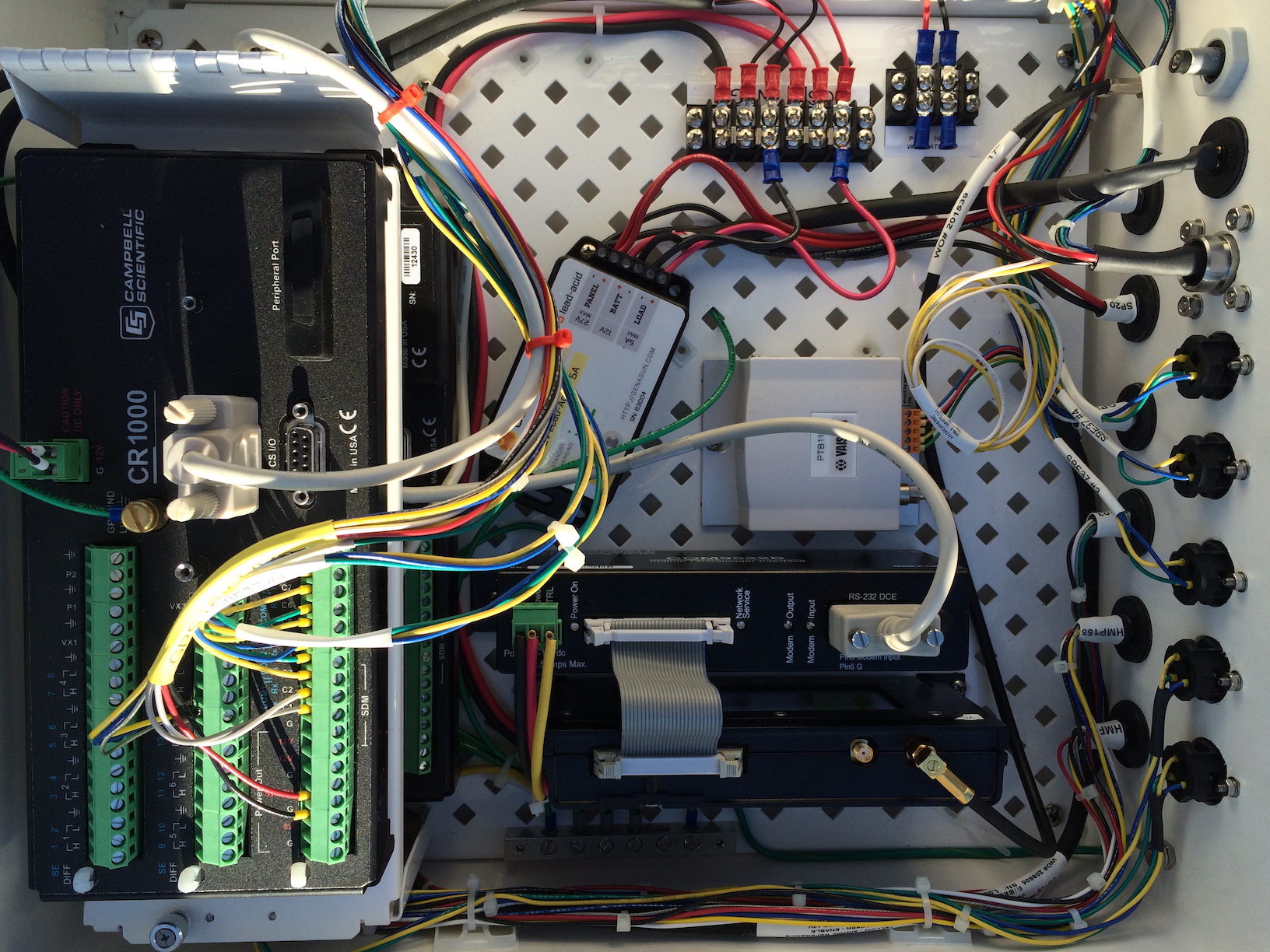
Inside of University of Delaware command and control of five ocean sensors and surface weather station. Two computers are stacked above each other on the left.

Inside of University of Delaware command and control of five ocean sensors and surface weather station. Two computers are stacked above each other on the left with satellite modem 9522B on bottom left with RS-232 cable connecting to computer (Campbell Scientific CR1000).

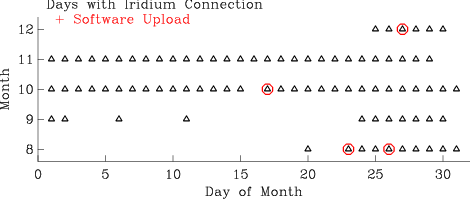
In contrast, the dial-up method delivers a gap-free data set, but its bi-polar behavior drives me nuts. There are periods when each scheduled call results in a connection and new data, but there are also periods when each scheduled call fails to connect. Over the last 4 months I made 1450 calls to Greenland. Only 189 of these 1450 calls resulted in a connection. That is a failure rate of 87%. It admittedly includes one desperate day (Sept.-18) when I made a call every 3 minutes and each call failed. This desperation was after a 10-day sequence of failed calls when I lost my cool. There were 86 out of 130 days when a successful connection was made, that’s still a large failure rate of 34%, but there are zero missing data so far. [The station was set up Aug.-20.]

Logs-OWS

The advantage of the fickle dial-up connection is that I only need one connection to recover all data that has been collected since the last successful call. This differs from the SBD text message, where a lost connection means lost data. Furthermore, the connection to the Greenland station is a regular RS-232 connection which acts the same as the iPhone connected to the computer from which I type these lines. Hence software changes are possible, too, as scary as they may be.

Now why is the Iridium connection acting in a such a bi-polar fashion, that is, working like a charm for weeks and months to suddenly shut down completely for days to weeks just as suddenly? My honest answer is that I do not know. Furthermore, nobody really knows for sure. There is some talk in hidden places that Iridium modems or phones “de-register” themselves from the Iridium network, if they do not start a phone call. This is no problem for the SBD message as the Greenland modem always does the calling. It does matter for my dial-up, because the Greenland modem never initiates a call, it only responds when called after the Greenland computer gives it the power to do so. Which brings me to

‘Fake call’
Register_Modem = “ATDT 1234″ & CHR(13) & CHR(10)
SerialOpen (ComRS232,19200,0,0,2000)
Delay (0,1,Sec)
SerialOut (ComRS232,Register_Modem,””,0,0)
SerialClose (ComRS232)

The “fake call” is a software update that tells the Greenland modem to, well, make a fake call. The text string Register_Modem contains a non-existing phone number (I hope) 1234 as well as a carriage return CHR(13) and a line feed CHR(10) and the string is send via SerialOut to the modem that is addressed here as ComRS232 after the serial port between Greenland computer and modem is opened via SerialOpen. Lets see how this works over the next days, weeks, and months. For the first time, I received this morning a response from Greenland that it was “BUSY.” I took this as a good sign …

PostScript: Data look awesome with new, large, and unexpected diurnal variations that started Dec.-8.

Ocean temperature (black) and salinity (red) below Petermann Gletscher from Dec.-6 (Day-340) through Dec.-31 (Day-365). Top panel is just below the glacier ice at 95-m below sea level while bottom panel shows data 810-m below sea level.

Ocean temperature (black) and salinity (red) below Petermann Gletscher from Dec.-6 (Day-340) through Dec.-31 (Day-365). Top panel is just below the glacier ice at 95-m below sea level while bottom panel shows data 810-m below sea level.

Sun Sets over Petermann Gletscher

Lights are out. Our ocean weather station on a floating glacier of northern Greenland confirms what the U.S. Naval Observatory reports for location 60 degrees and 30 minutes West longitude and 80 degrees and 40 minutes North latitude: As of today the sun is no longer above the horizon and will not rise until 23 February 2016. Total darkness means no solar power for the station that will have to survive on a fancy car battery temperatures as low as -50 degrees centigrade. Last week with the sun still up our station recorded -30.4 degrees celsius about 4 feet above the ice. How long will the station survive on that car battery?

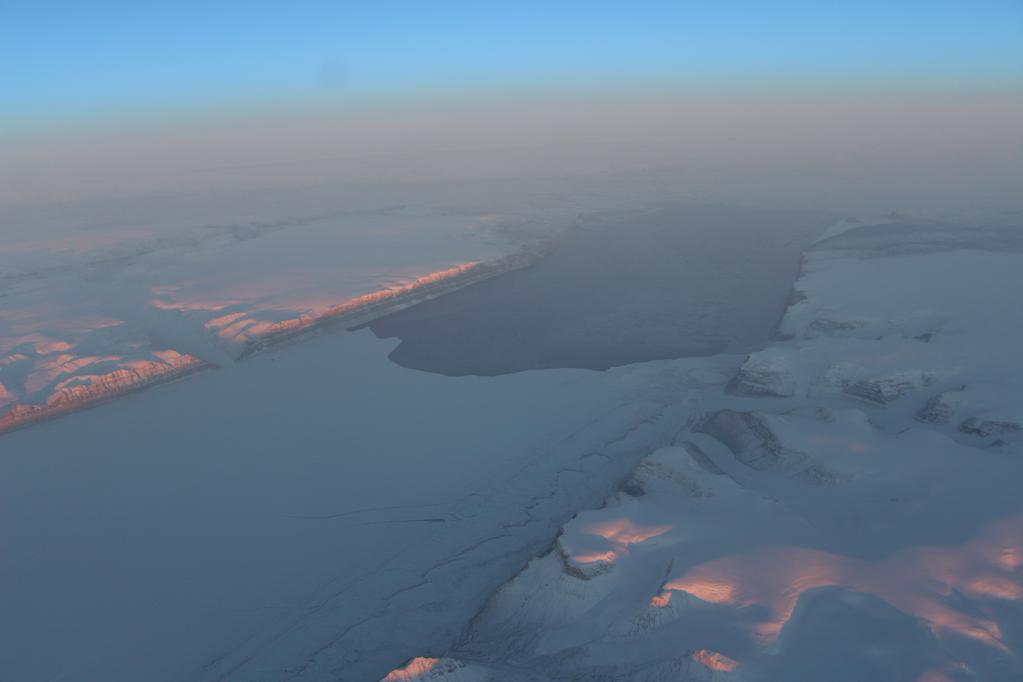
Petermann Gletscher at dawn on 5 Oct. 2015 as captured by NASA Operation IceBridge. Our Ocean Weather Station is in the corner bottom left.

Petermann Gletscher at dawn on 5 Oct. 2015 as captured by NASA Operation IceBridge. Our Ocean Weather Station is in the corner bottom left.

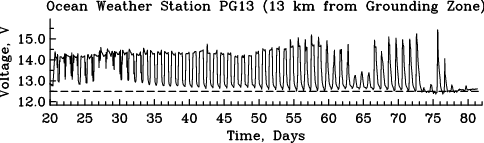
Without power the station does not function, because each sensor, each computer, and each telephone call via the Iridium satellite system requires electricity. Without power I am in the dark about what the station does or what ocean or air temperatures are. Since I do have power at the moment, well, I got new data. For example, there is a voltage that the station sends me …

Voltage at Ocean Weather Station on Petermann Gletscher.

Voltage at Ocean Weather Station on Petermann Gletscher.

… whenever the sun is up, the solar panels recharge the battery and the voltage goes up. As I use electricity, the voltage goes down. Lets ignore a small temperature effect and details on how much electricity we draw at what “amperage.” Instead, lets focus on the regular up and down of voltage for the last 60 days and how it suddenly went flat. The flat line at 12.5 Volts tells me that the sun is down. The station now uses the car battery, but how long will this last? Quick answer is … a day, if I am dumb. Or 150 days, if I am smart. Time will tell, if I made a mistake in either my power budget or my computer code that gives and takes power to a range of sensors. Scary stuff, and my little sister Christina Parsons can attest, how nervous I was, when I uploaded new power-saving software that I wrote from my attic at home to the station in Greenland. The station did take the new software, restarted itself, and works making one data call each day instead of three. Data are still collected every hour, but I save 20% of total power.

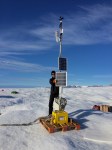
Power is something in Watts (40 W Light bulb anyone?) and you have to multiply voltage by current draw (0.5 Amps anyone?) to estimate the power needs of the device drawing 0.5 Amp current at 12 Volts. Incidentally, 0.5 Amps is what the Iridium satellite phone draws when it calls me with new data. Let me check my power budget, if this is true … nope, it only takes 0.365 Amps, so it takes 12 volts times 0.365 Amps equal 4.4 Watts which is about 1/10 of that 40 W light bulb you are looking at, perhaps, or the station we put up: the yellow box is the car battery powering all the gadgets you see and many more you do not:

What I just showed you is the beginning of a power budget that I had to make to get my station through the night, now that there is no more sun for the next 4-5 months. My car batteries are rated to give 110 Watts for an hour, so if I run my 4.4 W satellite phone all the time, I would be out of battery juice after 110 Watt-Hours divided by 4.4 Watts equals 25 hours. That’s bad, real bad, especially since one should not run a car battery to zero and the battery at -30 degrees Celsius may only give me half the power than it would at the more usual 15 degrees Celsius we got outside. The solution to this problem is to use the phone only for a few minutes each day, say 5 minutes. So, since I am using the phone only 5 minutes out of the 1440 minutes that each day has, it takes about 1440 minutes divided by 5 minutes times 25 hours equals 300 days for the phone running 5 minutes each day to run down the battery. Magic this math is not, but it shows how important it is to use resources (electricity) wisely. There are times and places where it is not possible to plug your iPhone into a power outlet. You get the picture … well, here are some that University of Delaware PhD student Peter Washam took who was part of the ice drilling team during last summer’s deployment of the ocean weather station:

So, as of this morning at 4 am Delaware time, the station now in total darkness tells me that the ocean temperatures 700 meters below the 100 meter thick glacier are +0.3 degrees Celsius while air temperatures 2 meters above the ice are -11.1 degrees Celsius. Now what that means to the melting of the glacier by the ocean, I will have to tell you at another time in more detail. These data are the ONLY data from below any glacier to the north of the equator. We are really breaking new ground and are making new discoveries as we go along … as long as there is power. Hopefully there is no dumb mistake in my power budget.

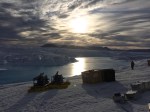
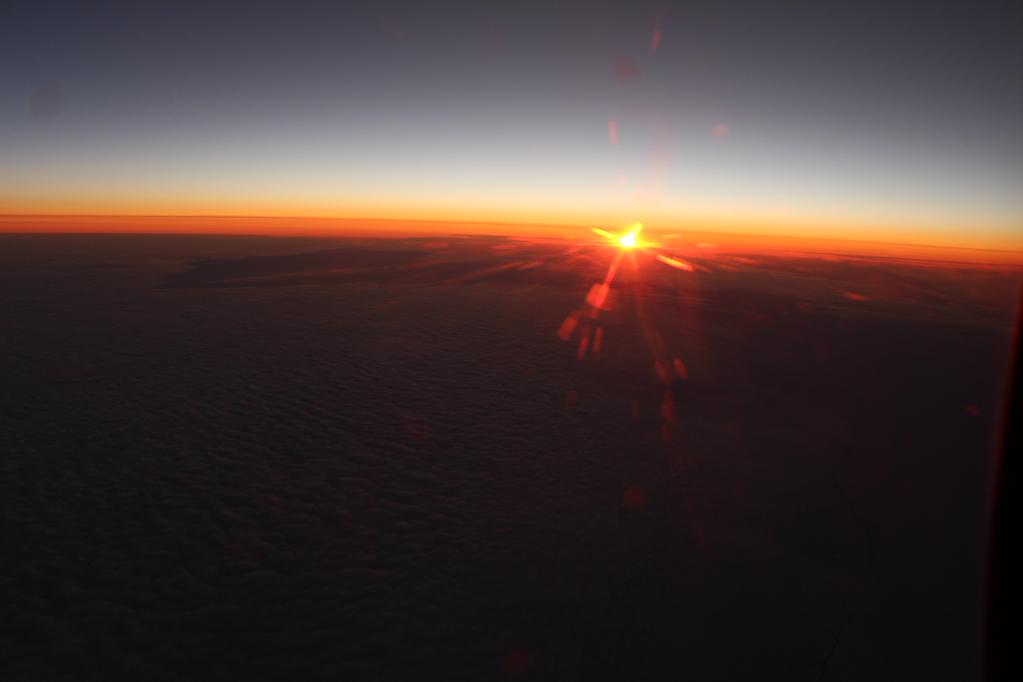
Sun over the horizon of Greenland as seen during NASA's Operation IceBridge Flight in October 2015.

Sun over the horizon of Greenland as seen during NASA’s Operation IceBridge Flight in October 2015.