Category Archives: Computing

Ocean Weather Below a Greenland Floating Glacier

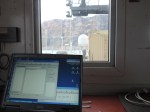
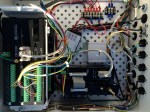
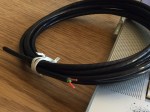
Sensing the oceans below ice as thick as the Empire State Building is tall, we are revealing some of the mysteries of ocean melting of one of Greenland’s largest glaciers. The expedition to Petermann Fjord last month made possible the deployment of three ocean sensing stations that all call home daily via Iridium satellite phone to send us new data from 800 meters below sea level. The ice of the glacier at our stations is 100 to 300 meters thick and a whimsical cable with 3 tiny wires connects the instruments under the glacier to a home-made computer that calls home daily with new data. I am still stunned at the many marvels of technology that all came together to make this happen.
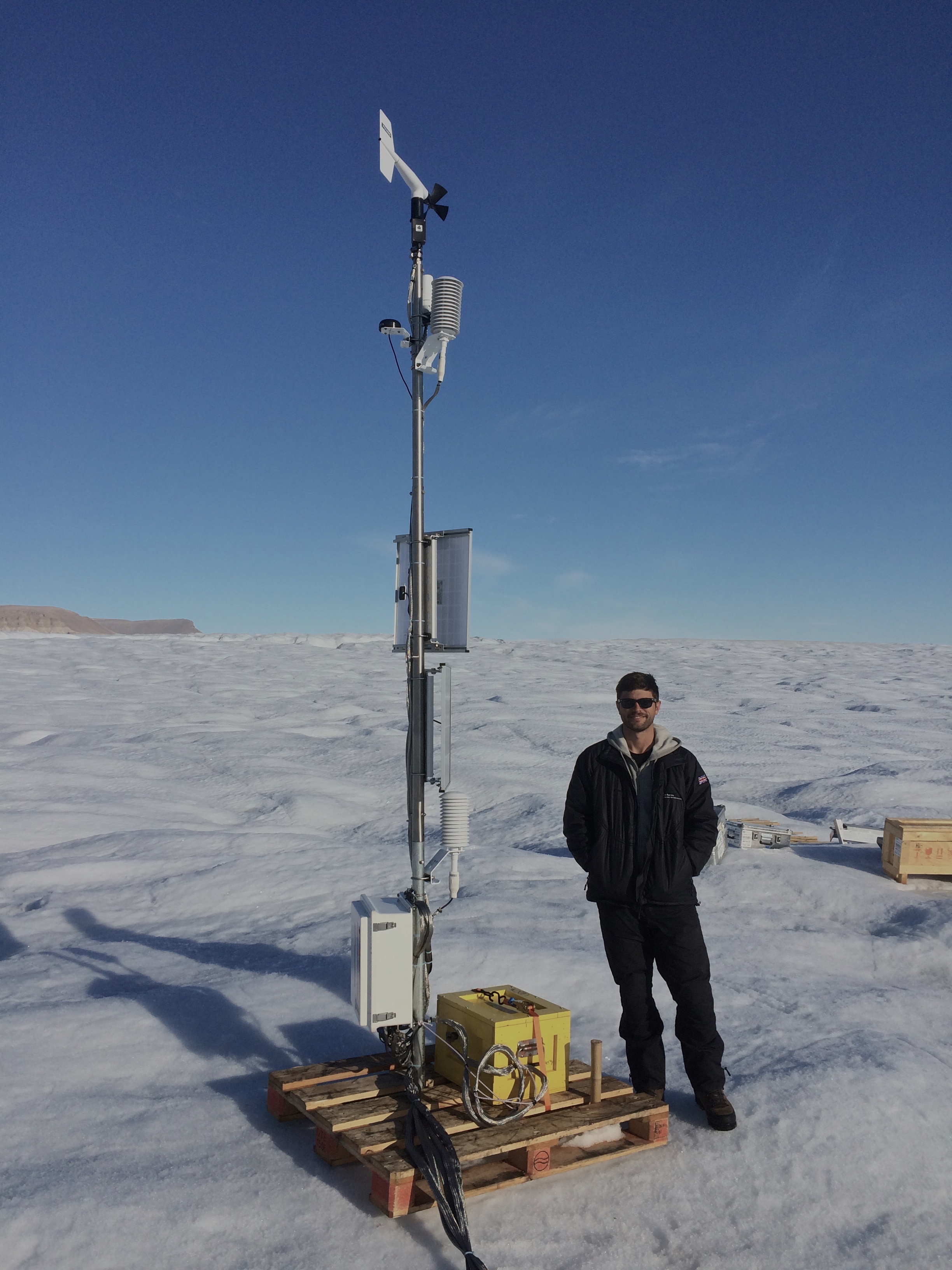
University of Delaware PhD student Peter Washam at the Ocean-Weather station on Petermann Gletscher after final installation 2015-Aug.-20, 17:00 UTC at 80 39.9697 N and 60 29.7135 W.

University of Delaware PhD student Peter Washam at the Ocean-Weather station on Petermann Gletscher after final installation 2015-Aug.-20, 17:00 UTC at 80 39.9697 N and 60 29.7135 W.

Panoramic view of the ocean-weather station on Petermann Gletscher. View is towards the south-east with Washington Land in the background.  [Photo credit: Peter Washam].

Panoramic view of the ocean-weather station on Petermann Gletscher. View is towards the south-east with Washington Land in the background. [Photo credit: Peter Washam].

It started with an off-the-shelf automated weather station that David Huntley at the University of Delaware put together for me with the non-standard addition of 5 serial ports that each allow one ocean sensor to be connected by cable to the weather station. It continued with the holes that Paul Anker and Keith Nicholls of the British Antarctic Service drilled through Petermann Gletscher. My PhD student Peter Washam was on the ice helping with the drilling, preparing the ocean sensors, and he is now processing some of the new ocean data.

AWS2015

The map above shows Petermann Gletscher (bottom right), Petermann Fjord, and adjacent Nares Strait. The red lines are bottom depths at 500 and 1000 meters while the thick black line shows the location where the 550-m thick glacier sits on bed rock. All glacier ice seaward of this black line is floating with warm ocean waters below. These waters enter the fjord at he sill at the entrance to Petermann Fjord which is about 450 meters deep. The blue dots are locations where last months we collected detailed profiles of ocean temperature salinity, and oxygen. The warmest water inside the fjord and under the glacier enters near the bottom at this sill. The green dots on the glacier are the 3 drill sites where we put our ocean sensors down while red triangles are “fancy” GPS receivers that we placed for almost 2 weeks on the glacier. The one triangle on land (bottom right) is a permanent GPS station at Kap Schoubye that UNAVCO maintains under the code name SCBY. We will reference our moving glacier GPS station (the glacier moves) to this fixed station on bed rock, but that’s a story for another day.

The ocean data are worked up by a small, but wonder group of men and women of all ages working out of the universities of Gothenburg (Sweden), Oxford (England), and Delaware (USA) as well as BAS (England). It is very much an informal group of people who like each other and met in strange ways over the last year or so with all of us juggling way too many projects for which we all have way too many ideas. Bottom-up collaboration and sharing at its best from the bottom up.

Two quick highlights rushed onto these pages before I have to run off to teach a class on signal processing:
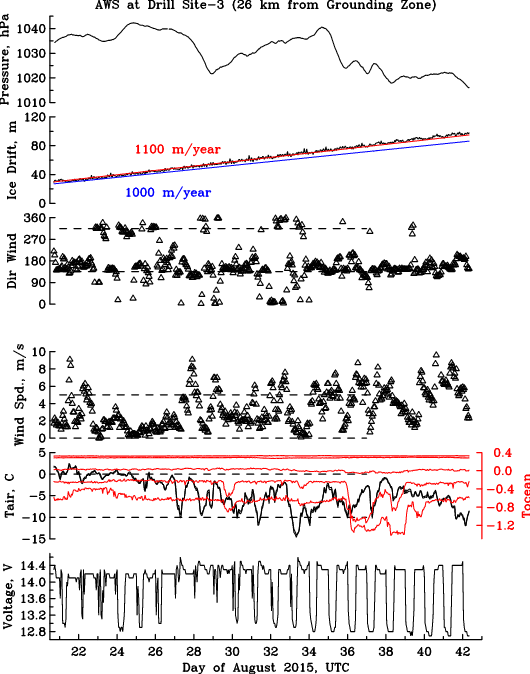
Measurements from the ocean weather station up until 2015-Sept.-11 as a function of time where Day-20 is Aug.-20 and Day-32 is Sept.-1. The station provides battery voltage (bottom panel), air and ocean temperatures, wind speed and direction, ice drift from GPS, and atmospheric pressure (top panel).

Measurements from the ocean weather station up until 2015-Sept.-11 as a function of time where Day-20 is Aug.-20 and Day-32 is Sept.-1. The station provides battery voltage (bottom panel), air and ocean temperatures, wind speed and direction, ice drift from GPS, and atmospheric pressure (top panel).

Ocean temperature (black) and salinity (red) observations from below the ice shelf of Petermann Gletscher at 5 different vertical levels from near the bottom (bottom panel) to the ice-ocean surface (surface panel).

Ocean temperature (black) and salinity (red) observations from below the ice shelf of Petermann Gletscher at 5 different vertical levels from near the bottom (bottom panel) to the ice-ocean surface (surface panel).The bottom of the ice shelf is about 90 meters below sea level.

Note that the scales for temperature and salinity are different at different vertical levels. The warmest water is always found near the bottom while both temperature and salinity under the ice shelf vary by a larger amount that we had initially expected. This means that there are direct and fast connections of the ocean under the glacier with waters inside the fjord and beyond. Notice also that air temperatures are well below freezing (0 degrees Celsius) for 2-3 weeks now while the ocean waters are well above freezing (-1.7 degrees Celsius) everywhere. Hence there is no melting at the surface while there is much melting at the bottom of the glacier. While trivial, this emphasizes the controlling influence that the oceans have on glaciers and ice shelves such as Petermann Gletscher. In the meantime, we got much exciting and fun work ahead of us.

Shout of thanks to NASA (and the US tax-payers) who funded this ocean-weather station at the University of Delaware at about $64,000 for a single year and NSF (and again the US taxpayers) who funded the larger ocean- and land-based experiments within which small part was embedded.

Münchow, A., Padman, L., and Fricker, H.A. (2014). Interannual changes of the floating ice shelf of Petermann Gletscher, North Greenland from 2000 to 2012, Journal of Glaciology, Vol. 60, No. 221, doi: 10.3189/2014JoG13J135

Johnson, H., Münchow, A., Falkner, K., & Melling, H. (2011). Ocean circulation and properties in Petermann Fjord, Greenland Journal of Geophysical Research, 116 (C1) DOI: 10.1029/2010JC006519

Rignot, E., & Steffen, K. (2008). Channelized bottom melting and stability of floating ice shelves Geophysical Research Letters, 35 (2) DOI: 10.1029/2007GL031765


Lab Notes of a Physical Oceanographer

I go to sea to learn about oceans, glaciers, weather, and climate. Despite dramatic photos of exciting field work, those action-packed scenes or serene nature shots of beauty and violence are misleading. Most of my time is spent sitting an a desk in a spacious office with books, papers, telephone, and most important of all, my computers.

Most of my time is spent writing. The writing is varied and ranges from illustrated essays on IcySeas.org to computer code. Add technical writing of research proposals, papers, and reviews for funding agencies and scientific journals. My screen rarely looks like what is shown above with the beautiful LandSat image of 79N Glacier as a screen-saver, it actually looks like this

Picture 2

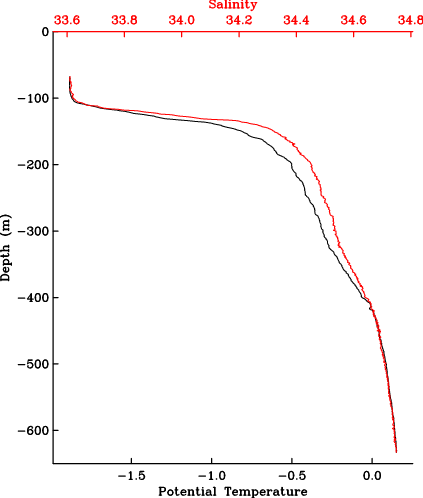
The blog-writing window is open on the right while a Fortran computer code is in the top left. The code processes temperature, salinity, and pressure data from Petermann Glacier. When the code is run in the bottom-left window, it produces numbers. In this specific case, the numbers are from the only profile of temperature and salinity that exists from Petermann Glacier. Koni Steffen collected the data in 2002. Columns are depths that start at -68 (meters), salinity at 33.774 (no units, think of this as grams per kilogram), temperature at -1.885 (degrees centigrade), and the last column is the density anomaly These numbers are better presented as a graph:

Koni2002raw

Notice that temperature and salinity start only at -68 meters. This is because the ice at this location was about 68-m thick. The Big Ben clock in London is about 96-m high, but this piece if Petermann was chosen because it was less hard to drill through 2/3 of Big Ben’s height when compared to drilling through the glacier ice a mile away where the ice is thicker than the Empire State Building in New York; but I digress.

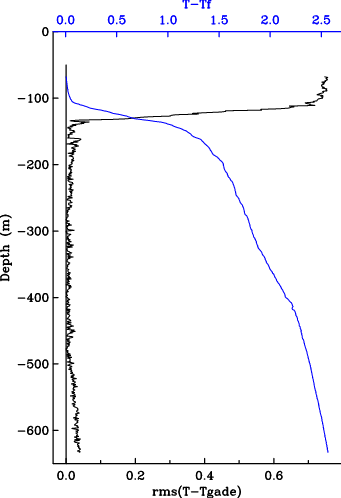
The profile above reveals a pattern we find almost anywhere in deeper Arctic Waters: Temperature increases with depth. Under the ice at 68-m depth, water is at its freezing point. As you move down the water towards the bottom, salinity increases and so does temperature. It is still cold, about +0.2 degrees Celsius, but this is heat from the North Atlantic Ocean that for perhaps 20-50 years circled all the way around the Arctic Ocean from northern Norway, past Siberia, past Alaska, past Canada to reach this spot of Greenland. While this appears marvelous, and it is, this is NOT what gets a physical oceanographer excited, but this does:

Koni2002Gade

It is the same data, but I did some reading, physics, algebra and code-writing in that order. First, instead of temperature, the blue line shows the difference between temperature T and the temperature Tf above the freezing. The difference T-Tf relates to the amount of heat available to melt the ice somewhere. The black line is the real killer, though. It combines salinity and temperature observations to reveal where the glacier water resides at this location that was melted somewhere else. Without going into the physical details, glacier meltwater is present where the black line touches zero (the so-called Gade-line, so named after a Swedish oceanographer who proposed its use in 1979). This happens at a depth from about 280-m to 500-m depth. This means that the glacier is NOT melting where it is as thin as Big Ben, but instead where it is as thick as the Empire State Building. So this is where we will need to place our instruments.

Proving my initial point, I spent two hours of fun writing this blog. I now will have to focus on more technical writing to pay the many bills of sea-going research. These “lab-notes” also serve as a document to raise $10,845 to install instruments this summer through Petermann Gletscher, have a look and give a little, if you can at

https://experiment.com/projects/ocean-warming-under-a-greenland-glacier

Shellshock Bugs, Macs, and Unix Powers

I love my Apple to bits. My writing, teaching, coding, graphing, and playing are all done on a MacBookPro with two Intel 2.4 GHz processors running OS X 10.5.8 called “Leopard.” It was the up-to-date operating system from 2006-2009 and I never saw the need to change, as I was too lazy to fix something that is not broken. Until today when I learnt of a vulnerability deep inside the guts of my beloved Unix-machines.

For over 5 years this laptop has been running non-stop doing scientific computing on huge amounts of ice, ocean, and satellite data. It is this Unix environment that I cherish as it is open, transparent, elegant, and concise. It also allows me to use unlimited codes and tools of many open-source communities. My Apple also traveled with me on ships and planes to Arctic Canada, Greenland, Norway, Germany, and anywhere in-between. It travels daily on my bicycle from home to work and back.

Today I was worried when my student Pat told me about shellshock, a bug that potentially can give control to a hostile party smart enough to exploit this vulnerability for which Apple has not yet released a patch. So, did I have a problem? You bet.

STEP-0: From a terminal I entered the command

env x='( ) { : ; }; echo vulnerable’ bash -c “echo this is a test”

If the word “vulnerable” appears, then the bug is present. Also check the second flavor of the bug by entering the command

env X='( ){(a) =>;\’ bash -c “echo date”; cat echo; rm -f echo

If you see the actual date displayed (as opposed to the word “date”), then again you got the buggy code. Here is how I fixed it on my laptop and MacMini that hosts my work web-pages.

Step-1: I took this technical recipe, but not all elements worked for me:

$ mkdir bash-fix
$ cd bash-fix
$ curl https://opensource.apple.com/tarballs/bash/bash-92.tar.gz | tar zxf –

The above line failed me, but the added option -k worked to download the needed files from apple.com with the curl-command; the same was also true for the two other curl commands below that downloaded the patches from gnu.org It applies the patches to the files uploaded from apple.com prior.

$ curl -k https://opensource.apple.com/tarballs/bash/bash-92.tar.gz | tar zxf –
$ cd bash-92/bash-3.2
$ curl -k https://ftp.gnu.org/pub/gnu/bash/bash-3.2-patches/bash32-052 | patch -p0
$ curl -k https://ftp.gnu.org/pub/gnu/bash/bash-3.2-patches/bash32-053 | patch -p0
$ cd ..
$ sudo xcodebuild

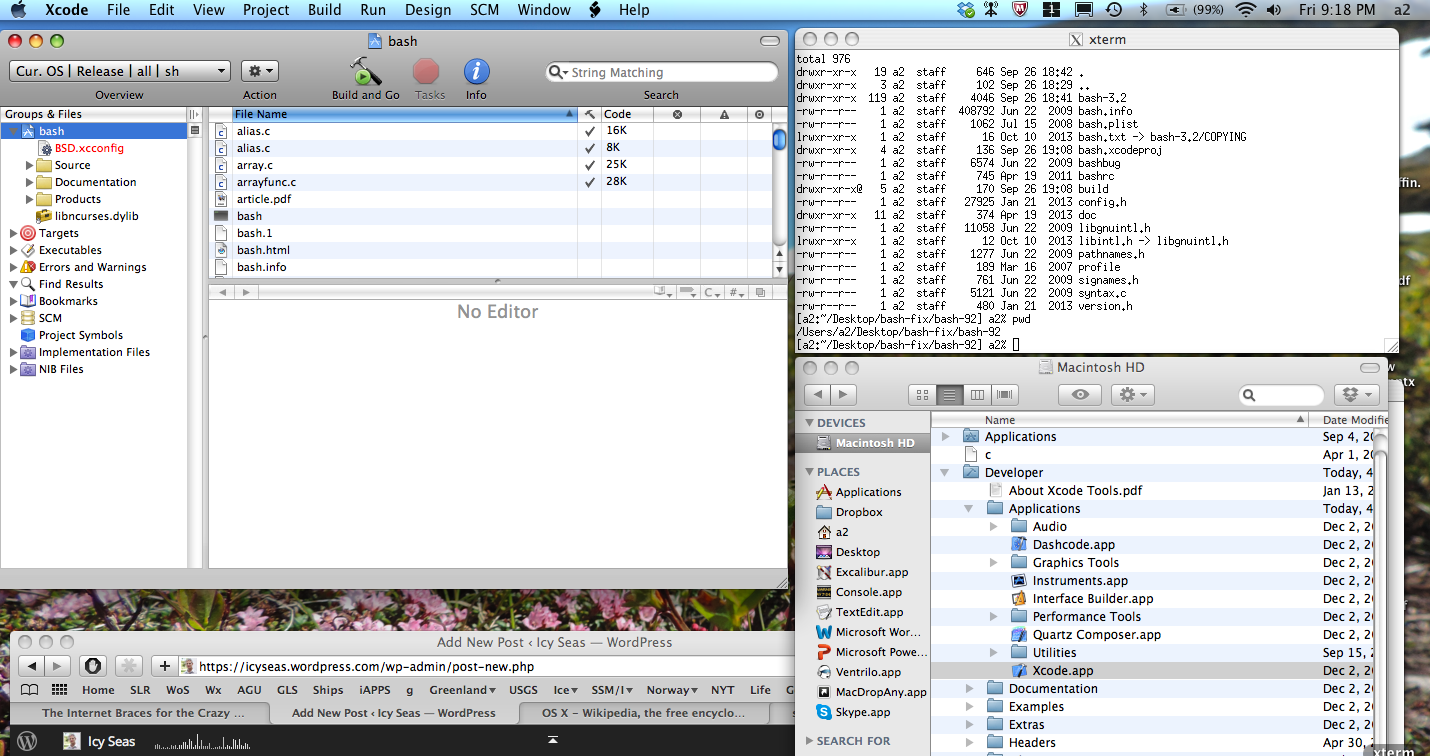
STEP-2: The above line “sudo xcodebuild” did not work for me for reasons I do not understand. I realized, however, that it was supposed to compile the patched codes to produce executable new files “bash” and “sh” free of the bug. I searched for and found the code-building application XCode.app on my computer as /Developer/Application/XCode.app and started it by point and click. Then via File > Open File I found the relevant “project file” bash.xcodeproj that was in the directory created previously, that is, bash-fix/bash-92 which I then opened within XCode.app Hit the button with the hammer called “Build and Go” and you build yourself a new bash.

Screenshot of compiling patched bash.xcodeprof using XCode.app

Screenshot of compiling patched bash.xcodeprof using XCode.app

STEP-3: Once the compilation and building of the executables is complete, all that needed to be done was to move the newly created, patched executable shells “bash” and “sh” into their rightful places deep within the guts of the operating systems. First, however, lets just save the buggy old files. From the command line

$ sudo cp /bin/bash /bin/bash.old
$ sudo cp /bin/sh /bin/sh.old

and as the last step move the new, patched “bash” and “sh” to their
root directory /bin:

$ sudo cp build/Release/bash /bin/.
$ sudo cp build/Release/sh /bin/.

I moved the binary files “bash” and “sh” to my web-hosting MacMini after renaming the old buggy ones, oh, and as a good practice (short
of deleting those old system files), I changed the permission settings.

Credit for this way to reduce a vulnerability on my dear machine belongs to this concise blog whose content is also presented in a more chatty voice. Wired Magazine adds a little drama in their story titled “The Internet Braces for the Crazy Shellshock Worm, but it took me longer to write and assemble this essay than it did patching the bug.

Unix is fun to hack.
Eric S. Raymond

Unix is not so much an operating system as an oral history.
— Neal Stephenson

ADDENDUM Sept.-28, 2014: A quick online to test for vulnerable web-sites and cgi scripts.

ADDENDUM Jan.-6, 2015: I apparently missed 3 more vulnerabilities that the above test may not check for, e.g., http://tenfourfox.blogspot.com/2014/09/bashing-bash-one-more-time-updated.html